
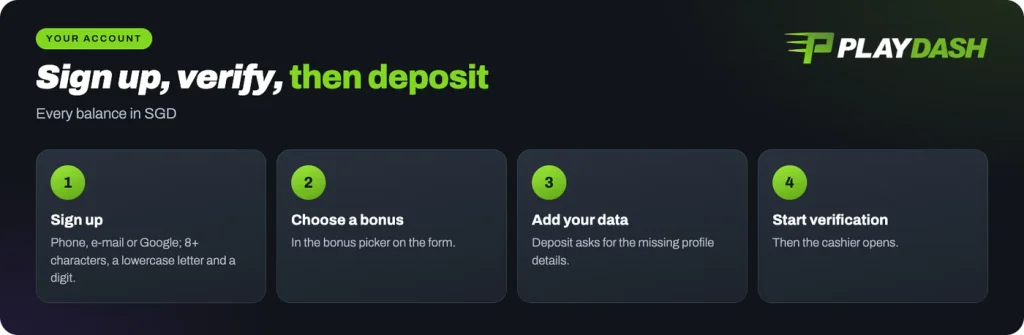
A Playdash account comes in four parts: sign up, verify, fund, play. Each part has one screen and one clear next step, and every balance you will see is in SGD. Check that the law where you live allows you to play before you register. The sign-up form asks you to confirm you are over 18; our Singapore pages are written for players aged 21 and over.
Both header buttons, Get Started and Log In, lead to the same lobby, so it makes no difference which one you tap first.
| Detail | Playdash |
|---|---|
| Sign-up | Phone, e-mail or Google |
| Login | Phone, account number or e-mail, or Google |
| Password | 8+ characters, a lowercase letter, a digit |
| Before first deposit | Profile and verification |
| Balances | Available, casino bonus, sports bonus |
| Support | Live Chat, Telegram |
Playdash sign up: register your account
The sign-up form opens with two tabs, Phone and E-mail. Pick phone and a country-code selector with a flag appears beside the number field; pick e-mail and you simply type the address. Continue with Google sits above both if you would rather not set a password at all.
If you do set one, the rules show live as you type: at least 8 characters, at least one lowercase letter and at least one digit.
Two fields on this screen matter later. The first is the bonus picker at the top, where you choose your welcome offer before the account even exists, so settle the three welcome offers and their card terms before you deposit rather than after. The second is I Have a Promo Code, for a promo code you already hold; leave it empty if you do not have one.
Below the password sits the age and terms checkbox. Tick it, confirm, and your Playdash registration is complete.
- Tap Get Started. The sign-up form opens in the lobby, with the bonus picker at the top.
- Sign up with phone, e-mail or Google. Set a password that meets all three rules, then choose your bonus from the picker.
- Open Deposit. On a new account this asks you to add the personal data still missing from your profile.
- Start verification. Follow the steps shown on the screen until the profile is marked complete.
- Deposit through a method the cashier shows. The cashier lists what is available to your account once verification is done.
Log in to Playdash
Returning is shorter. Continue with Google is at the top again, and under it three tabs: Phone number, Account number and E-mail, each paired with your password. Use whichever detail you remember; they all reach the same account.
Forgotten the password? Forgot your password? sits on the same form.
Your account number is the numeric ID on the Profile screen, which is useful to note down because it also identifies you when Live Chat needs to look something up. Signing in brings back more than your balance: your Daily Quests timer, your PD Coins and your tier sit behind the same login, and they work as one connected reward loop rather than as separate offers.
Playdash verification, deposit and withdrawal
Deposit and Withdrawal sit side by side on the account screen, but on a brand-new account Deposit does not open a cashier. Instead it asks you to add more data: fill out the rest of your profile, then Start verification. Plan for that step before your first deposit.
Verification first
The cashier stays closed until your profile and verification are complete, so finish both before you plan a deposit.
Once that is done, your first Playdash deposit can go through: the cashier opens and shows the methods and the limits available to your account. The payment logos in our lobby footer are SurePay, FastPay and DG Pay. A Playdash withdrawal is requested from the same account screen, and the cashier shows its methods and limits for your account in the same way.
The Verification Quest
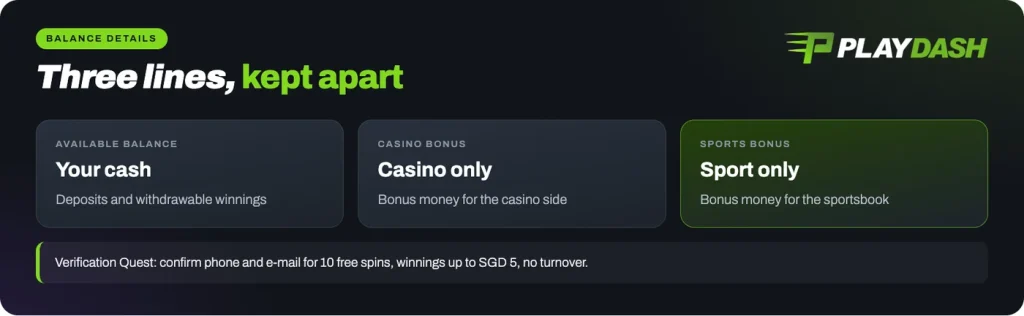
Confirming your details pays something back. The Verification Quest in Daily Bonus asks for two things, your phone number and your e-mail address, and credits 10 free spins when both are confirmed.
Read the limit on those spins before you expect much from them: winnings are capped at SGD 5, which is the ceiling whatever the spins land on. In exchange there is no turnover requirement at all, so the SGD 5 is yours to use or withdraw under the normal account rules. Treat it as a small thank-you for finishing a step you needed anyway, never as a reason to deposit. If a confirmation message does not arrive, Live Chat can look at it.
Balances in your account
Balance Details splits your money into three lines: Available Balance, Casino Bonus and Sports Bonus. Bonus money is held separately for casino and for sport, so each bonus stays with its own product. Check which line a reward landed in before you look for it elsewhere.
The account menu keeps the records beside them. Payments history lists deposits and withdrawals, Casino history your game rounds, and My bets your settled and open tickets. Daily Quests only count settled bets, so My bets is also where you check whether a quest should have ticked over.
The Playdash app and APK download
The Playdash app download button sits inside our lobby. If you have been searching for a Playdash apk, that button is the one to use; a file from anywhere else is not ours.
You do not have to install anything. The lobby is built as a responsive web app, so opening it in your phone’s browser gives you the same left menu, the same SGD balances, the same Deposit button and the same chat bubble.
Either way, the account is the same account. Log in on a phone and your quest progress, Loot Boxes and PD Coins are where you left them on a laptop.
Help and keeping your account secure
Live Chat is the fastest route to a person. The chat bubble appears on every screen of the lobby, and it is also the channel used for things like a referral claim or a challenge verification. Our Telegram channel carries announcements if you prefer to follow rather than ask.
One security rule covers nearly every scam attempt: we never ask for your password or a one-time code in chat. No agent needs either to help you, so anyone who asks is not us. If a message feels wrong, stop and compare it against how to recognise our lobby before you reply to it.
Before messaging, Help and Information in the account menu is worth opening first. For anything about your own account, give your account number and the detail you used to register, and the agent can find the rest.
Sign-up takes one form: phone, e-mail or Google, a password that meets the three rules, and your choice from the bonus picker.
Players ask
How do I log in to Playdash?
Tap Log In and either continue with Google or choose the Phone number, Account number or E-mail tab, then enter your password. If the password will not come back to you, use Forgot your password? on the same form.
Can I sign up with Google?
Yes. Continue with Google sits on both the sign-up and the login form, so you can create the account and return to it without setting a separate password.
Why can I not deposit yet?
On a new account, Deposit asks you to fill in the missing personal data and then start verification. Once your profile and verification are complete, the cashier opens and shows the methods and limits available to your account.
Is there a Playdash app?
The app download link sits inside our lobby. The mobile lobby also runs in your phone’s browser, with the same menus, balances and Live Chat bubble.
How do I contact support?
Open the chat bubble on any screen to reach Live Chat, or follow our Telegram channel for announcements. Help and Information in the account menu is worth a look first.
What age do I need to be?
The sign-up form asks you to confirm you are over 18. Our Singapore pages are written for players aged 21 and over, and we ask you to treat 21 as the line.